
Gone are the days when recording youth soccer required a $1,500 dedicated brick. The new wave of AI sports tracking leverages the supercomputer in your pocket. We test the market leaders—Veo Go, XBotGo Falcon, and Pix4Team—to see if BYOD is finally ready for prime-time. Here’s the shift that’s been going on in grassroots soccer is that more and more parents are filming their kids soccer games, but it’s been a very uneven experience. So it starts by (a) parents start by holding their phones, which results in shaky clips. and then quickly moves to (b) even when they get a tripod, they still miss the majority of the enjoyment of watching their daughter’s soccer game because they’re watching the entire match through a lens. But there is some hope of the horizon. There is space opening up in the market as people realize there are better options available – and not just for clubs. Now there are realistically priced AI camera options for the “home cook” type of user (for lack of a better phrase.) Suddenly in 2026, there are now good options for parents to record the game and get a viable recording. And this is particularly important as kids get older, and parents need good recordings of full games to create highlight reels to help their kids go D1.
Quick Verdict
-
- Best Overall: XBotGo Falcon It offers the best balance of price, simple setup, and high-quality robotic tracking without forcing you into a monthly subscription.
-
- Best Analytics: Veo Go Accessing the Veo software ecosystem is the only way to get world-class, professional-grade match stats and heatmaps.
-
- Best Pro Quality: Pix4Team 2This is for serious programs that want to use dedicated 4K camcorders with actual optical zoom instead of a smartphone.
The market has shifted. You no longer need a $1,500 dedicated unit to record your games. Your phone is powerful enough. Maybe the Veo ecosystem fits your club. Sometimes you just want the footage on your phone immediately. I think the XBotGo Falcon is the clear winner for most parents. It just works. You buy the hardware, and you own the footage. No hidden fees. No “three-device dance” before kickoff. If you need the data, go with Veo. If you want the video, get the Falcon.
Introduction: The Paradigm Shift in AI Soccer Cameras
For the first half of the 2020s, the AI sports camera market was defined by expensive, dedicated hardware. If you wanted automated tracking, heatmaps, and professional-looking highlights of your child’s U12 game, you bought a VEO Cam or a Pixellot Air. You paid over a thousand dollars for the unit, and then another thousand dollars a year to unlock the software. It was an undeniably effective model, but a financially exhausting one for grassroots teams. But now it’s 2026, and the landscape of video tech for soccer AI cameras has shifted. Smartphone processors (like the A19 Bionic and Snapdragon 8 Gen 5) became exponentially more powerful, and their camera sensors began rivalling entry-level DSLRs. It became harder to justify buying a standalone camera whose specs were inferior to the phone already sitting in the coach’s pocket. (Even filming on a decent tripod and an iPhone14 is viable.) So we have a new frontier, folks! It’s called the “Bring Your Own Device” (BYOD) revolution. This new category of sports tech promises to democratize filming your son’s soccer games, and can also pop in some extra advanced analytics and broadcasting capabilities. Instead of buying a camera, you buy a “smart rig” or a robotic gimbal, plug in your own smartphone, and let an app do the heavy lifting. But is it too good to be true? Does relying on a phone’s battery and storage mid-match create more headaches than it solves? In this comprehensive guide, we are putting the three champions of the BYOD camp to the test. We will look at Veo Go, the controversial new entry from the market leader that requires a “community effort” of devices; the XBotGo Falcon, the mature robotic gimbal that championed the no-subscription model; and the Pix4Team 2, the high-end robotic solution for those who want to use real camcorders instead of phones. Grab a coffee and some KT tape, and let’s jump into the definitive 2026 guide to BYOD soccer recording.
Review 1: Veo Go
The Ecosystem PlayTLDR Answer Section
Is the Veo Go worth it? Yes, but only if you are already heavily invested in the Veo software ecosystem and belong to a team where multiple parents own recent iPhones. It is the cheapest way to get Veo’s world-class analytics, but the logistical headache of requiring three separate iOS devices to record a single game makes it a tough sell for casual users looking for simplicity.
Introduction
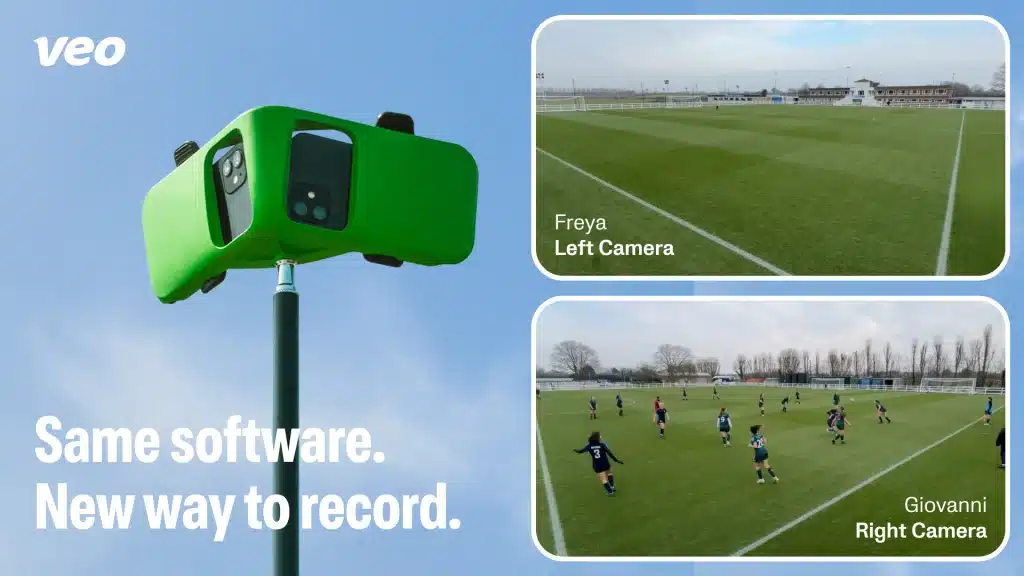
Veo resisted the BYOD movement for years. In 2026, realizing they were losing the grassroots market to cheaper competitors, they launched Veo Go. It is not a standalone camera. It is a hardware rig and a software solution designed to turn multiple iPhones into a panoramic recording system. It is targeted squarely at existing Veo clubs needing secondary cameras for lower-tier teams, or budget-conscious squads who desperately want Veo’s famous AI processing without the $1,200 hardware cost.
Value and Pricing
The upfront cost is deceptively low. The Veo Go rig (a specialized dual-phone mount and tripod adapter) costs around $199, sometimes heavily discounted or free if you commit to a long software contract. However, the value proposition is complicated by the hardware requirement: You need two iPhones (iPhone 11 or newer) to act as the cameras, and a third iOS device (iPhone or iPad) to act as the controller. If your team has three spare iPhones lying around, the value is immense. If you have to buy used iPhones just to make this work, the value vanishes instantly.
Setup and Installation
This is Veo Go’s biggest hurdle. Unboxing is simple, but pre-game setup is stressful. You must snap two iPhones into the rig, ensure both have enough battery and storage, open the Veo app on both, and then use a third device to pair them via Bluetooth. Getting the two recording phones to sync perfectly and align their ultra-wide lenses to cover the whole pitch requires patience. The learning curve is steep; expect the first 3-4 games to involve frantic troubleshooting before kickoff. It is not a “drop and go” solution like the main Veo Cam 3.
Recording Quality
The video resolution depends entirely on the iPhones you use. Two iPhone 15 Pros will yield spectacular 4K results. Two iPhone 11s will be acceptable but grainier in low light. Veo Go works by having each phone record one half of the field statically using ultra-wide lenses. Veo’s cloud servers then “stitch” these two videos together to create one panoramic view. In bright daylight, the results are excellent, rivaling dedicated units. In low-light or night games, phone sensors struggle more than larger cameras, leading to muddier footage. The tech is truly awesome to bring this together, and the stats from Veo are world-class.
Looking to improve your touch? Try this.
AI Performance and Features
It’s vital to understand that Veo Go does not physically track the ball. The rig sits still. All the “tracking” is done digitally in post-production. So you don’t need to move the tripod at all. (This is a huge plus.) The angle of the mounting rig ensures the entire field of play is covered. The AI is applied after you upload the footage. Veo’s AI remains the industry benchmark in 2026. It is incredibly accurate at identifying players, following the action, and creating a “broadcast view” that zooms in and pans digitally around the stitched panoramic video. Because it records everything all the time, the AI rarely “misses” an important off-the-ball incident.
Battery Life and Power
You are at the mercy of three separate device batteries. Recording 4K video continuously drains an iPhone battery rapidly, especially in cold weather. You absolutely need external power banks hooked up to the two recording phones for a full 90-minute match. If one phone dies, the entire recording fails. (Pro tip: switching the iPhone into Airplane mode saves a ton of battery life.)
Storage and Data Management
This is a significant friction point. A 90-minute match recorded across two phones in high definition creates massive file sizes (potentially 30GB+ per phone). You need significant free space on the devices. Furthermore, the upload process is arduous. Both phones must be connected to Wi-Fi to upload their respective halves to the Veo cloud for stitching. This takes hours. You cannot simply grab the video file off the phone instantly; you must wait for Veo’s servers to process it.
Monthly Subscriptions and Ongoing Costs
Veo Go is useless without a subscription. Veo has introduced a “Starter” tier for Go users, roughly $40/month, but it is heavily capped (e.g., only 10 hours of video processing per month). To unlock unlimited recording and advanced analytics, you need the standard team plans, which run upwards of $1,000 annually. You are paying for the software brain, not the hardware.
Durability and Build Quality
The rig itself is sturdy plastic, but your iPhones are exposed elements. Rain is a major issue. While newer iPhones are water-resistant, touchscreen interfaces tend to bug out in heavy rain. Overheating in direct summer sun is a far more common problem, causing iPhones to shut down mid-game.
Mounting and Positioning
The rig fits standard tripods. Like all static panoramic cameras, positioning is vital. It needs to be at the halfway line, elevated at least 15-20 feet, to get a good angle for the stitching AI to work correctly.
Post-Production and Sharing
Once the arduous upload is complete, this is where Veo shines. The Veo Editor is superb. It automatically creates highlight reels, allows coaches to draw on screen, tag players, and share clips instantly via a link. The ecosystem for sharing with players and parents is seamless and remains best-in-class.
User Experience from the Field
User feedback on Reddit and Facebook groups is polarized.
-
- Praises: Coaches love access to the Veo analytics platform without the $1,200 hardware buy-in. When it works, the video quality from modern iPhones is stunning.
-
- Complaints: The “three device dance” is universally hated. Users report high anxiety pre-game trying to coordinate phones from different parents. Upload times and phone storage limitations are frequent complaints.
Customer Support and Warranty
Veo support is generally responsive but often overwhelmed during peak soccer seasons. The warranty covers the plastic rig, but obviously, Veo takes no responsibility if a stray ball smashes the screen of the iPhone you mounted on it.
Compatibility
As of 2026, Veo Go is iOS exclusive. It requires iPhone 11 or newer for the recording devices due to the need for specific ultra-wide lens architectures. Android users are currently entirely locked out of the recording aspect of this ecosystem.
Final Verdict
Veo Go is a powerful, albeit clunky, bridge into the premium Veo ecosystem. It is a logistical challenge masquerading as a budget solution.
-
- Buy this if: You are a coach whose club already uses Veo and you need an extra angle, OR you are a tech-savvy parent on a team where everyone has recent iPhones and unlimited data plans.
-
- Skip this if: You use Android, you hate relying on other people’s hardware to do your job, or you want instant access to video footage after the final whistle.
Get the Veo Go Here
Review 2: XBotGo Falcon
The Robotic MaverickTLDR Answer Section
Is the XBotGo Falcon worth it? Absolutely. For the vast majority of parents, amateur teams, and high school programs, this is the best value proposition on the market in 2026. If you want high-quality, TV-style broadcast footage without paying a mandatory monthly subscription fee for the rest of your life, the Falcon is the clear winner.
Introduction

XBotGo (formerly known as Blink Focos) was one of the first movers in the smartphone gimbal space. By 2026, their technology has matured significantly. The XBotGo Falcon is their “Pro” model gimbal. Unlike Veo Go, which stares at the whole field and zooms digitally, the Falcon is a motorized robot that physically pans and tilts your smartphone to follow the ball, mimicking a human cameraman. It targets the massive “prosumer” market that wants great video without enterprise-level pricing.
Value and Pricing
The XBotGo Falcon retails for approximately $599. This includes the advanced gimbal, the tripod mount, and a carrying case. The value is exceptional because it is a “pay once, cry once” model. There are no mandatory ongoing fees to use the basic tracking hardware. Compared to spending $3,000 over three years for a Veo subscription, the Falcon pays for itself in one season.
Setup and Installation
Setup is refreshingly simple compared to Veo Go. You need one smartphone (iOS or Android) and the gimbal. You mount the phone, turn on the gimbal, and open the XBotGo app. Calibration takes about 30 seconds before kickoff. You point it at the center circle, tell the app which sport you are playing, and hit record. The learning curve is minimal; most users are comfortable with it by their second game.
Recording Quality
The Falcon is a standalone so it does not move. This is an advantage over the previous XbotGo. The XbotGo Chameleon gimbal physically moves the phone to keep the action centered, it utilizes the primary, highest-quality lens on your smartphone, rather than relying on inferior ultra-wide lenses or digital cropping. On a modern phone like a Samsung S25 or iPhone 16, the footage is spectacular—true 4K with optical depth of field. The resulting video looks much closer to a real TV broadcast than the sometimes “fish-eye” look of panoramic cameras. It handles low light better than Veo Go because it’s using the phone’s best sensor.
AI Performance and Features
The AI lives on the phone app and communicates with the gimbal motors via Bluetooth. In 2026, their tracking algorithm has become highly sophisticated. It is excellent at distinguishing the ball from players and ignores crowd movement. It handles fast transitions (like a long goal kick) smoothly. The “jerky” robotic movements of early models are gone, replaced by fluid pans. It can occasionally get fooled by a cluster of players on the far sideline, but it usually re-centers quickly. It also features “Follow Mode” where you can designate a specific player for the camera to track for the entire game—a feature parents love.
Battery Life and Power
The gimbal itself has a battery life of over 4 hours, easily enough for a doubleheader. The limitation is your phone battery. Because the app is running intense AI processing live while recording 4K, it torches phone batteries. An external power bank connected to the phone while it’s in the gimbal is essentially mandatory for a full 90-minute match.
Storage and Data Management
This is a major advantage over Veo. The footage is recorded directly to your phone’s camera roll. When the game is over, you have the file instantly. You don’t need to upload it to a cloud server to process it. You can AirDrop it, upload it to YouTube (because all the kids want to see their “goals”), or edit it immediately on the drive home.
Monthly Subscriptions and Ongoing Costs
Zero mandatory fees.This is XBotGo’s primary marketing weapon. They do offer an optional “Cloud Plus” subscription (around $10/ month) which gives you cloud storage and an automated highlight generation tool similar to Veo’s, but the core functionality—tracking and recording—is completely free forever.
Durability and Build Quality
The Falcon gimbal is robust, built with aluminum alloy and high-impact plastic. It feels professional. However, like Veo Go, your phone is exposed. XBotGo sells a rain cover accessory that is highly recommended for wetter climates. The motors are strong enough to handle heavy phones even in moderate wind.
Mounting and Positioning
It works with standard tripods. Positioning is more flexible than panoramic cameras. While halfway-line elevation is best, the Falcon handles sideline views or lower angles better than Veo because it can actively tilt up and down to follow the play.
Post-Production and Sharing
If you don’t pay for their optional cloud service, post-production is on you. You get a raw 90-minute video file. You have to chop it up yourself using iMovie, CapCut, or Adobe Premiere. Sharing is as easy as sharing any video file from your phone.
User Experience from the Field
-
- Praises: The “no subscription” model is universally adored. Users love the broadcast feel of the panning video and the immediacy of having the file instantly after the game.
-
- Complaints: Phone overheating in summer is the biggest issue reported across all user groups. Some users find that if Bluetooth interference is high at a crowded tournament, the gimbal connection can occasionally stutter.
Customer Support and Warranty
XBotGo support has improved significantly as they scaled up. They have a very active user community that solves most problems faster than official support. Standard one-year warranty on the hardware.
Compatibility
The Falcon is device-agnostic. It works equally well with iOS and Android. It accommodates large phones (like the “Pro Max” or “Ultra” models) easily.
Final Verdict
The XBotGo Falcon is the liberating choice in the 2026 market. It delivers professional-looking, dynamic footage without holding your wallet hostage.
-
- Buy this if: You want excellent video quality, you hate subscriptions, and you want instant access to your footage. It’s the best choice for 80% of parents and amateur teams.
-
- Skip this if: You require deep, professional-grade tactical analytics (heatmaps, pass completion rates) immediately, which Veo’s expensive software still does better.
Get the XBotGo Falcon
Review 3: Pix4Team 2 (by Move ‘N See)
The Broadcaster’s BYODTLDR Answer Section
Is the Pix4Team 2 worth it? Only for a very specific niche. It is overkill for a U10 parent. This robot is designed for semi-pro clubs, high-end academies, or college programs that already own high-quality camcorders (like Sony’s or Canons) and want to automate them. If you want real optical zoom and superb image quality over long distances, this is the only choice.
Introduction
While Veo Go and XBotGo rely on smartphones, the Pix4Team 2 (from French company Move ‘N See) is a heavier, more industrial robot designed to hold “real” cameras. It is the bridge between consumer tech and professional broadcasting equipment. It doesn’t just pan and tilt; it controls the zoom of compatible camcorders.

How To Play Soccer in Europe Here's How We Did It..
Value and Pricing
It is expensive for a BYOD product. The robot itself costs around $1,400. However, the value proposition relies on what you already own. If your club already possesses a $2,000 Sony 4K Handycam that sits unused because nobody wants to film, the Pix4Team 2 unlocks that investment. If you have to buy the robot and a camcorder, the price approaches the all-in-one units.
Setup and Installation
It is cumbersome. The unit is heavy. Setup involves mounting the robot on a sturdy tripod, mounting your camcorder on the robot, connecting specific LANC control cables between the camera and the robot, and then setting up a separate phone or tablet to run the control app. It is a 15-20 minute setup process best suited for permanent home fields, not quick away games.
Recording Quality
This is where Pix4Team 2 is unrivaled. Because it uses a real camcorder with true optical zoom (not digital zoom like phones or Veo), the quality at long distances is superb. You can see jersey numbers clearly on the opposite side of a full-sized 11v11 pitch. The image quality is dictated by the camera you plug into it, which can be broadcast-grade. Boom, baby!
AI Performance and Features
The tracking is incredibly smooth. Because it controls the camera’s physical zoom lens, the AI automatically zooms in when the action gets tight near the goal and zooms out when the ball moves to midfield. This creates the most authentic “TV cameraman” feel of any automated device. (Which is really nice for re-watching the games.)
Battery Life and Power
The robot has a massive internal battery that lasts 4–5 hours. Your limitation will be the battery of the camcorder mounted on top, which usually requires external power for long days.
Storage and Data Management
Data is recorded to the SD card in your camcorder. Like the XBotGo, you own the footage instantly. No required clouds, no waiting for processing.
Monthly Subscriptions and Ongoing Costs
Similar to XBotGo, the basic tracking functionality is subscription-free. You buy the hardware, and it works. They offer premium software packages for live-streaming via 5G modems, but for recording, it’s free.
Durability and Build Quality
It is built like a tank. Heavy industrial plastic and metal. It is designed to live outdoors. While the camcorder needs rain protection, the robot base is highly weather-resistant.
Mounting and Positioning
It requires a heavy-duty tripod due to the combined weight of the robot and a camcorder. It is less portable than the other options.
Post-Production and Sharing
You get raw video files on an SD card. Editing and sharing are entirely manual unless you subscribe to third-party analysis software.
User Experience from the Field
-
- Praises: The video quality with optical zoom is unbeatable. Users in windy areas love that the heavy unit doesn’t shake.
-
- Complaints: It’s heavy and annoying to transport. Finding the exact right cables to make specific older camcorders talk to the robot can be frustrating.
Compatibility
It is compatible with a wide range of Sony and Canon camcorders (check their website for a specific list). The control app works on iOS and Android.
Final Verdict
The Pix4Team 2 is a professional tool for serious programs that want to utilize existing high-end video equipment.
-
- Buy this if: Your program demands the highest possible video clarity with optical zoom, and you already own compatible camcorders.
-
- Skip this if: Portability is a priority, or you want a simple setup process.
Comparative Analysis & Conclusion
The 2026 marketplace proves that you no longer need to spend thousands on dedicated hardware to get amazing AI-tracked soccer footage. The smartphone in your pocket is ready for the job.
Your choice comes down to three factors: Ecosystem, Footage Style, and Subscriptions.
Feature
Veo Go
XBotGo Falcon
Pix4Team 2
Device Required
3 iOS Devices
1 Smartphone (Any)
DSLR/Camcorder
Footage Style
Panoramic, Digital Zoom (Static)
Dynamic Pan/Tilt (Robotic)
Dynamic Pan/Tilt + Optical Zoom
Setup Difficulty
High (Syncing phones)
Low (Plug & Play)
High (Cabling & Heavy)
Footage Access
Slow (Must upload to cloud)
Instant (On phone)
Instant (On SD card)
Subscription
Mandatory & Expensive
Optional / None
Optional / None
Best For
Existing Veo clubs needing extra angles.
Parents, amateur teams, high schools.
Semi-pro, academies with existing camera gear.

I discovered soccer as a U-6 coach. I love soccer, futsal on the weekends in a men’s league. I am now living in Portugal (and playing futsal!)
Check out my new directory of incredible football training tools.
I watch UEFA Champions League when I’m not playing, and I catch regular games with this North American streaming service.
Here’s how we ended up getting my son to play football in Europe.
(Use this VPN).